

“Hello, my name is Natalie, and I’m addicted to Pinterest.”
Are you hooked yet? Do you just love it? If you haven’t gotten on the Pinterest bandwagon, shoot me an email and I’ll send you an invitation. Pinterest is the place to be these days. I’ve abandoned so many other tools, and I am now a fully-fledged, self-proclaimed Pinterest ADDICT.
In case you have no idea what I’m talking about, here’s the definition I give my friends. The conversation usually goes like this:
Me: “…so when I pinned that to my Pinterest boards…”
Friend: “I’m sorry, when you what?”
Me: “Pinned. You know, Pinterest?”
Friend: “What’s Pinterest?”
Me: {insert inner squee here} “It’s like visual bookmarking! It’s life changing! It’s the best thing ever!”
If you want to check it out, you can watch a great tutorial on how to get started here.
I think some people are under the impression that Pinterest is only for women. Or that Pinterest is only for bloggers and people who are online 24/7. But in fact, Pinterest is a valuable tool that can help you in so many ways. Aside from the addictive, eye-candy experience that I simply must have on a nearly-daily basis, here are a few other things I’ve started using Pinterest for.
#1: I’m done with “bookmarking”
This is my favorite one.
Ah, good ol’ bookmarks. Go on- check your bookmarks in your browser. Give ’em a click and hover through them. Are they organized? Do you have category upon category of bookmarks? Or all they all just lumped together in one ginormous list, waiting for you to sort them out on a day when you have nothing to do? Mine were a mess. I tried to keep them organized, and then I’d go back through them from time to time and ask myself, “Whaaa? Am I supposed to remember these?”
So here’s what I did. I had so many bookmarks that this probably took me an afternoon or two (but it was totally worth it). I sat down and made myself open all of those bookmarks, one by one. I pinned the ones to my boards that I still liked- projects I want to do, places I want to go, recipes I want to remember or try. Other links I realized were no longer active, so they were just taking up virtual space in my browser. Then, when I had gone through everything, I deleted them. Forever. Now, my bookmarks look like this:
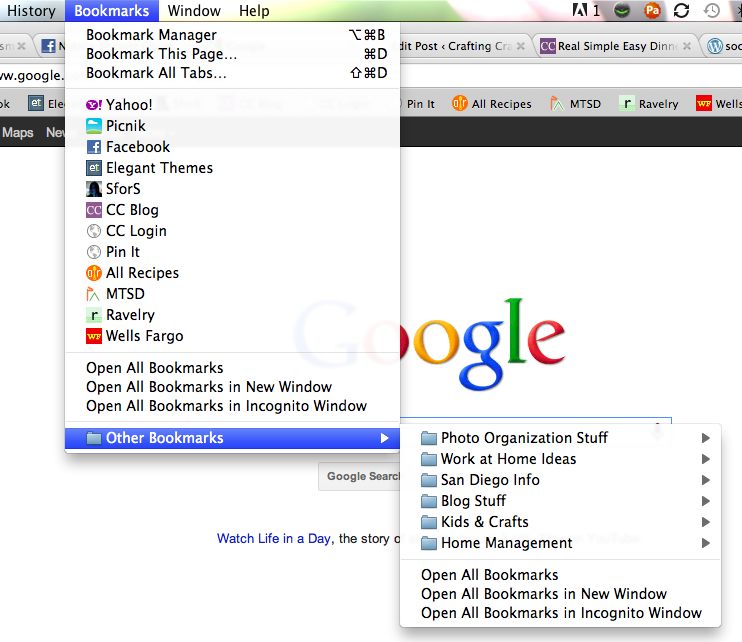
Everything is neat and tidy, and really there are hardly any links in those folders- nearly all of them were moved to Pinterest or deleted.
It is so much nicer to have a picture associated with a link. Visual, people, visual!
#2: Organizing and Planning Projects
How many projects does any person have on their to-do list that take planning? Everyone does at some point. Pinterest is such a great place to get ideas for anything you want to do. Parties, revamping a lamp, dinner menus- the possibilities are endless.
For example, I am planning on giving our kitchen chairs a major overhaul. Paint, new fabric, etc. Not only can I search Pinterest for ideas, but I can also pin different fabrics I’m considering so that I can see them all at once. I can also show them to my husband all at once so that he can say, “Yes to the stripes. Hell no to the elephants.” See what I mean by visiting my Kitchen Chair Project board.
So what now?
Are you convinced yet? It didn’t take me long to get hooked. A few other things to know:
– Pinterest sometimes gets wonky. You may check your boards and it will look like pins are missing. Usually they fix it within a few hours, so don’t freak out.
– You can’t pin everything. Some sites don’t have the right kind of graphics (or any graphics at all), and some sites somehow block it. For example, I’m a Ravelry user (a site for knitters & crocheters) and usually you cannot pin projects from Ravelry onto your boards.
– You can get totally addicted in two seconds flat. It is the best time-suck ever. I will be posting in the next week or so some other things I’ve done inspired by Pinterest, so it’s not a complete time-waster. Sometimes you will see an idea for something that will change your day-to-day life. It’s awesome!
And I will restate: if you’re not on board yet, email me! I’ll shoot you an invitation to join!
What have you done with Pinterest? Tell me!

One Comment
Keep Up With the Crazy


About Natalie
 Life is crazy. Craft it well. Thanks for stopping by Crafting Crazy! I'm stumbling into a new sort of life after leaving a 12-year teaching career. More of a practical crafter, I'm trying to temper the perfection a bit. If I mess up, I’ll be sure to share- then we can laugh together. Here you'll find anything I like that makes my life better or fun. Crafts, of course, but also posts about food, home decor, exercise... whatever I'm dabbling in at the moment. I'm so glad you're here- thanks for stopping by!
 Content Brewing!

Ready to Rock?
I’m a Clever Girl!
SITS-stahs!

Chronically Distracted


This work is licensed under a Creative Commons Attribution-NonCommercial-ShareAlike 3.0 United States License.

I will have you know that YOU are the one who made me “get” pinterest. I wasn’t quite sure what to make of it until you explained that you use it as a bookmarking system. LOVE that.
It is SO addicting…